
TSA laptop rules, what you actually need to know before you fly
Sarah Pardi - August 6, 2026
Home > Travel Guide > Travel Requirements, Policy & Authorization > TSA laptop rules, what you actually need to know before you fly
Share this post
If you’ve flown a lot, you’re likely familiar with this rule: Take your laptop out, put it in its own bin, wait with it until it goes through the scanner. Nowadays, this rule is only sometimes true. It depends on which airport and even which lane you go through. This means it isn’t a golden standard.
Here is what actually applies in 2026 if you're flying from the US, what has changed in the past year when it comes to batteries, plus a couple of situations that can lead to the dreaded bag search.
Heading abroad?
Make sure you have the right travel insurance for your journey.
What are the TSA rules for laptops in carry-on bags?
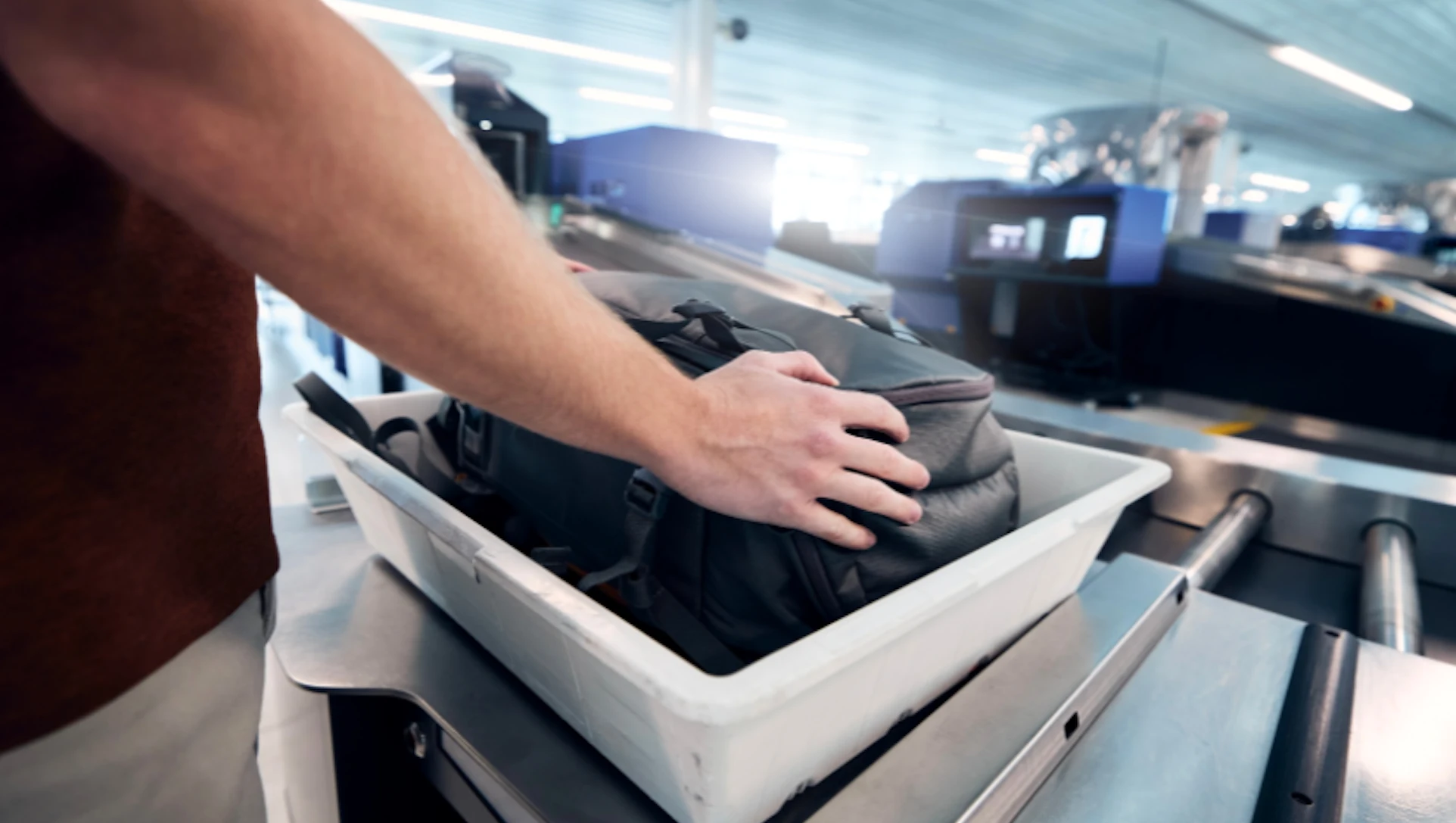
Laptops are allowed in your carry-on bag, with no limit on size, weight, or quantity (so long as the entire bag meets the size and weight requirements of your airline). Whether you have to take it out when you go through TSA, on the other hand… that depends on the scanner. At airports with older X-ray scanners, you have to remove it and place it flat in a bin on its own. If the airport has computed tomography scanners, the laptop can stay in your bag. If you have TSA PreCheck, you don’t need to remove it either way.
Many airports are upgrading to tomography scanners, and when they do, they sometimes update lane-by-lane, one at a time. Because of this, whether you take your laptop out or leave it in can even depend on the specific lane that you’re directed to.
| Situation | What Happens |
|---|---|
| Laptop in laptop bag, standard X-ray line | Remove it, laptop bag included |
| Laptop in any bag, CT scanner line | Leave it packed |
| Two or three laptops in one carry-on | Allowed, though could trigger a manual check |
| TSA PreCheck line | Leave it packed, regardless of scanner |
| Laptop with swollen battery | Not allowed |
| Laptop under manufacturer recall | Not allowed |
One thing that a lot of travelers don’t know about is the large electronics ban of March 2017. In the United States, large electronics were barred from the cabin on direct flights from ten airports across eight countries. That ban lasted only a few months, until July that year, but it’s an important reminder that rules and policies around laptops can (and do) change. The same is true for other regulated items, such as liquids.
How to travel through security with your laptop
First and foremost, you should follow the directions of the TSA agents. They will typically tell you whether or not your laptop needs to come out or stay in, and if they don’t, you can ask as you approach the conveyor belt.
One thing that you can do is to look at the people three or four places ahead of you. If bins are filling with laptops, you’re likely at a traditional X-ray lane, which means you’ll need to get yours out too. If bags are going through intact, and there’s no visible sign of a frantic last-minute scramble, the lane may have an upgraded machine. Typically, these kinds of scanners have a large, circular tunnel versus a flatter, more rectangular one. Again, listen to what the agents are instructing, and ask if you’re not sure.
Paying attention can save you from the most common mistake, which is unpacking a bag that didn’t need to be unpacked, or forgetting to take a laptop out and having to wait in line for a bag search. Both are annoying and waste your time.

There are two exceptions that you should also know about. TSA PreCheck members keep their laptops, shoes, belts, and TSA-approved liquids packed in every lane, regardless of scanner type. Second, in July 2025, the shoes-off requirement ended across all US airports. That said, a TSA agent can still ask you to remove your shoes.
Laptop battery rules and how to read your battery
Battery rules and regulations are extremely important – and that’s due to physics. The limitations come from the FAA rather than the TSA, and the policies (and limitations) are the same regardless of who you’re flying with and which airport you’re flying out of.
| Battery Capacity | In carry-on | In checked bag |
|---|---|---|
| Up to 100 Wh, installed in device | Yes | Yes, if fully powered off and protected |
| Up to 100 Wh, spare or power bank | Yes | Not permitted |
| 101 Wh to 160 Wh | With airline approval (max 2 per person) | Not permitted |
| Above 160 Wh | Not permitted | Not permitted |
| Damaged, swollen, or recalled | Forbidden | Forbidden |
How to find your capacity. Look for a number ending in Wh printed on either the battery, the underside of your laptop, or in the system information panel. If your laptop only shows a milliamp-hour number, you will need to convert it to get the Wh. There's information about how to do this on the official FAA website.
Standard laptop batteries are typically comfortably below the limit. Most thin laptop notebooks are between 40 and 75 Wh. Even larger gaming laptops are usually built to 99 Wh on the nose, because engineers have intentionally designed around that known aviation ceiling.
Spare batteries and power banks follow an important rule that many travelers don’t know about. They need to be carried in the cabin, never ever in checked baggage in the undercarriage. It doesn’t matter how small they are.
Extended and professional batteries between 101 and 160 Wh can typically be brought onto the plane, but only with airline approval before you fly. There is a 2-battery limit per passenger in this case, but the FAA also warns that some airlines may have stricter quantity limits, so check with your airline.
Bags with built-in batteries are eligible for the cabin when the battery is removable. If you check the bag, or if it winds up gate-checked, the battery has to be removed.
Can you put a laptop in checked baggage?
Laptops with built-in batteries can go into checked luggage, but your laptop must be completely shut off. Spare batteries and power banks should never go in checked luggage, and damaged or recalled devices or batteries are not allowed on the aircraft at all, regardless of where or how they’re packed.
Batteries come with fire risks. All lithium batteries have the potential to overheat, which can turn into a dangerous situation called thermal runaway. If this happens, the battery can get extremely hot, very quickly, and cause a fire. In an aircraft, that’s immediately a very serious situation. Thermal runaway can be caused by a lot of different things – the battery being dropped, something falling on it, overcharging, water exposure/damage, even manufacturing defects. Smoke or fire in the cabin can be noticed quickly – fire in the hold, not so much. While the hold is legally required to have smoke detectors, as well as a fire extinguishing system controllable via the cockpit, it isn’t a situation that anyone wants to be in.
TSA rules versus airline rules
There are a lot of different organizations at work when you fly. There’s the airport itself, the TSA, the airline, and then there are always governing authorities like the FAA. While the TSA screens you and the FAA sets battery limits, airlines can be stricter.
On January 28th 2025, an Air Busan aircraft caught on fire at the Gimhae Airport in South Korea. Investigators traced the cause of the fire to a power bank that had been placed in a bag in the overhead bin. The FAA logs dozens of lithium battery incidents each and every year.
As a result, airlines are tightening up their battery rules and allowances. American Airlines, for example, recently changed their power bank policy. Now, power banks are capped at two per passenger, 100 Wh maximum. They’re also not even allowed in the overhead bin anymore. They must stay within reach. You also cannot plug them into any of the onboard sockets.
While this is just one example of airlines reacting to the threat of thermal runaway, rules are popping up in order to keep passengers safe. Before you book your flight, check the carrier’s guidelines on batteries/power banks, particularly if you are planning to fly with more than one charger. In any case, check before you head to the airport to avoid confiscation.
Special cases, gaming laptops, old laptops, and swollen batteries
Gaming laptops can typically fly without any special procedure (if they’re in the hold, make sure they’re completely turned off). In most cases, the batteries are 99 Wh or lower, but still, check before you pack.
Old laptops are also typically ok to fly with, so long as they still work (turn on) and haven’t been recalled. TSA agents can even ask you to power on your laptop to verify its functionality.
Swollen batteries are not allowed on airplanes at all. A battery that has visibly expanded, deformed, or lifted the trackpad cannot be brought onto a plane – in the hold or the cabin. These batteries are at an increased risk of thermal runaway. If you have a laptop that is swollen, that means that laptop cannot come with you. Today, most laptops have batteries sealed/built-in. On older machines, the batteries could often be popped out, which meant that you could take the battery out if it was swollen, leave it behind, but still bring the laptop itself. Today, they aren’t really built that way. Before you fly, check to see if there is any swelling. If there is, you need to leave the laptop at home.
Do TSA rules apply on international flights?
TSA rules only apply at US airports, so if you’re departing from the US, you will encounter TSA for both domestic and international flights. TSA screens all of the passengers under current US legislation. When you return to the US, the security authority of the country you’re leaving may have their own procedures, which you will need to follow.
Even still, battery limits are close to universal, since the 100 Wh and 160 Wh thresholds don’t just come from the FAA, they come from ICAO standards, which most countries have adopted. (ICAO standards are also what dictate Schengen visa photos, for example).
Screening procedures can differ from country to country, or even airport to airport (CT scanners versus X-ray, for example). As you can see, airline regulations can also vary. When you’re traveling internationally, make sure you check the battery requirements for your destination(s) and any potential airlines you might be flying with.
Frequently asked questions about TSA laptop rules
 Sources & references
- Internal Expertise & Review
- Insurte is a travel insurance company with more than 15 years of experience. Our team is dedicated to helping travelers feel confident and informed through accurate, up-to-date, relevant travel guides and resources.
- TSA Guidelines:
- Can you bring laptops? : Search page where you can find what is and isn't allowed as a carry-on or in the under carriage.
- TSA Precheck & laptops : Information on bringing your laptops through the TSA PreCheck security line
- Federal Aviation Administration:
- Flying with batteries : Information on when/how you can fly with batteries
- Regulation 49 CFR 175.10(a)(18) : Legal text regarding batteries
- CFR 2014 : Cargo compartment classification guidelines for aircrafts (fire extinguisher requirements, fire safety)
- Airline Information:
- United Policy on Electric Devices : Information about laptops, phones, batteries, etc. on United Airline flights
- Power Bank Policy : The new power bank regulations from American Airlines
- Written by:
- Sarah Pardi - Staff Travel Advisor
- Fact-check and reviewed by:
- Clément Goubon
- Last updated:
- August 6, 2026
Learn more about our editorial standards and review process in our Editorial Policy.
Related posts


Upcoming travels ? Get Insured !
Find the right insurance for your trip by using our powerful comparison tool!
Sarah Pardi - October 23, 2026